
What are the different roles in a crew? How do I change them?
What are the roles?
The Captain is the owner of the support crew and has full access. They are the only person who can delete the crew.
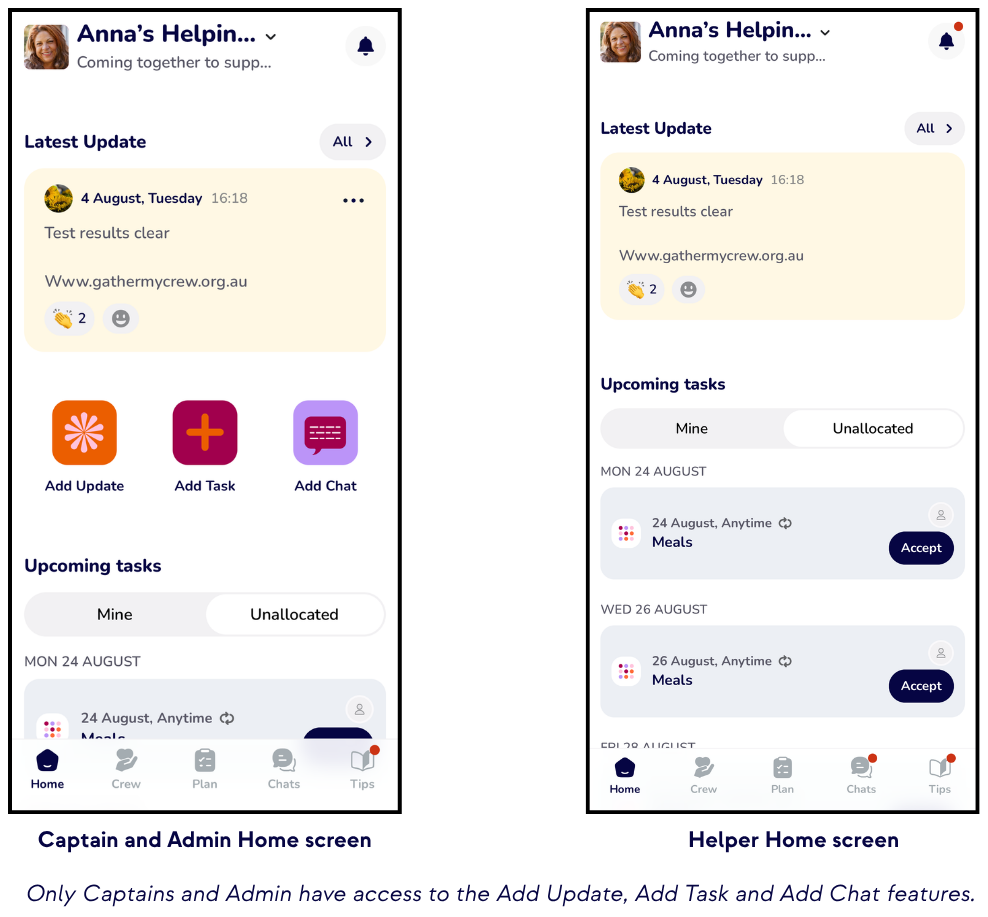
Admin help manage the crew. They can send invitations, manage tasks, create guides, share updates, edit preferences, and start chats.
Helpers make up the rest of the support crew. They can accept tasks, respond to chats, and view shared content.
Sharing the running of your crew.
Sharing the management of a crew can make it so much more effective, especially if the Captain is the person needing support. Consider asking one of your Helpers, someone close, to be an Admin for you. They'll be able to send invites, let everyone know what is needed and take the pressure off you completely.
Not only does it spread the load, it's a lot easier to ask for help for someone else. And the great thing is, you can have as many Admin as you would like.
To change members' roles:
- On the Crew page, tap on the Members list.
- Tap the ellipsis next to the member's name.
- Tap Change Role.
- Choose which role and Change.
What is the Inner Circle?
The Inner Circle enables you to identify members of your crew who are the closest to you. When you create Tasks, Guides and Chat folders, you can nominate that they will only be visible to your Inner Circle. Admin are automatically in your Inner Circle.